

Settings and connection profiles
Choose Settings (the cog) at the right of the top bar. It holds the same fields as the login screen.
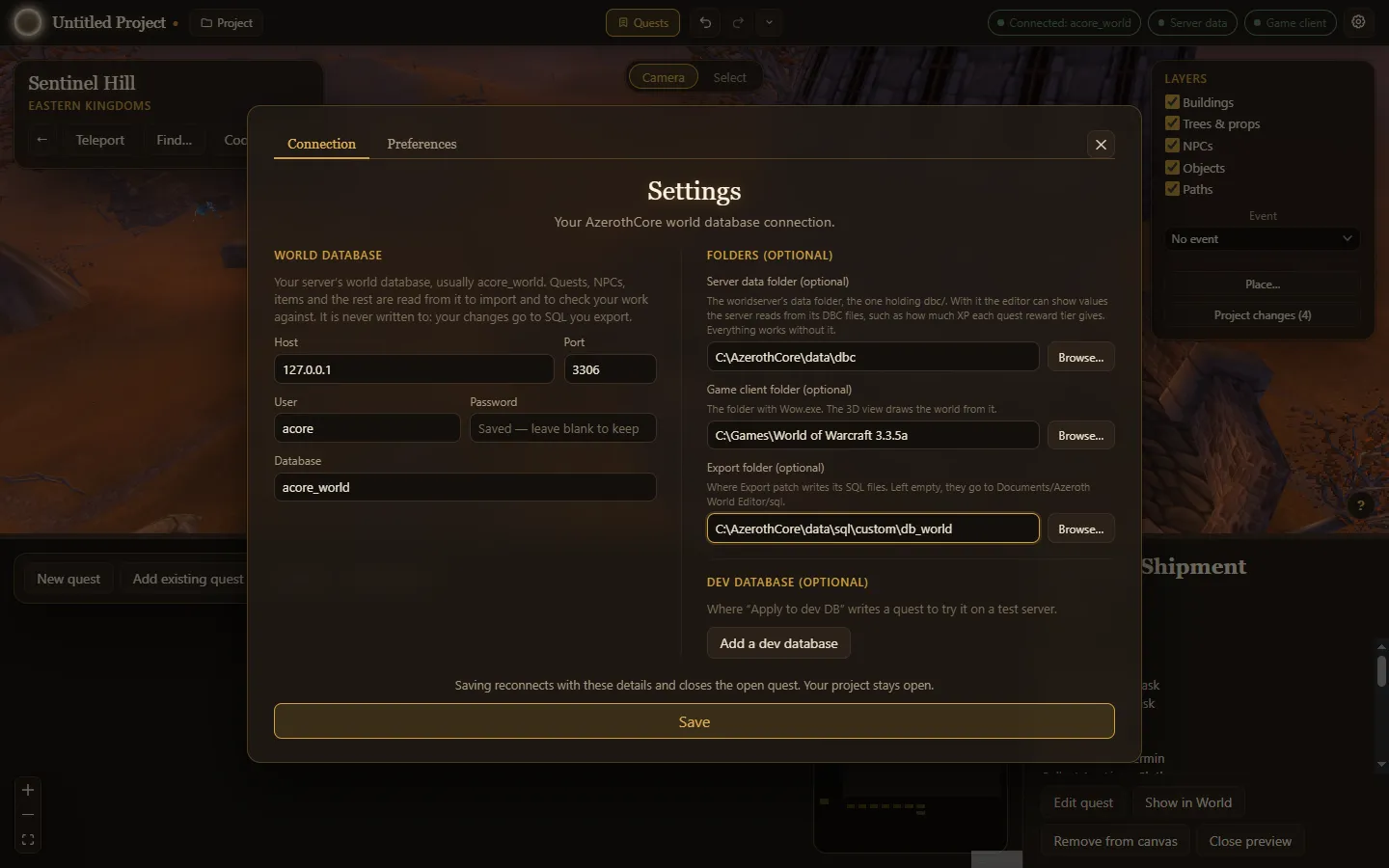
World database
Section titled “World database”| Setting | Meaning |
|---|---|
| Host | The MySQL server, such as 127.0.0.1. |
| Port | The MySQL port, usually 3306. |
| User | A MySQL user that can read the world database. |
| Password | That user’s password. Stored encrypted; leave blank to keep the saved one. |
| Database | The world database, usually acore_world. |
The world database is only ever read.
Folders
Section titled “Folders”| Setting | Meaning |
|---|---|
| Server data folder | The worldserver’s data folder, the one holding dbc/. Adds XP values, name search for spells and models, and ground height and floors in the World. |
| Game client folder | The folder with Wow.exe. The World is drawn from it in 3D. |
| Export folder | Where Export patch writes SQL files. Empty: Documents/Azeroth World Editor/sql. |
All three are optional.
Dev database
Section titled “Dev database”Add a dev database asks for a second host, port, user, password and database: a test server’s world database that Apply to dev DB writes to. Remove dev database turns it off again.
MCP / AI
Section titled “MCP / AI”The MCP / AI tab turns on the MCP server that lets an AI assistant work in the open project. See Working with an AI assistant.
| Setting | Meaning |
|---|---|
| Allow AI to edit this project | Starts or stops the server. Off by default; it applies at once. |
| Port | The port it listens on, from 1024 to 65535 (default 47600). |
| Allow lookups on warcraft.wiki.gg | Lets the assistant search and read pages on the Warcraft wiki. Off by default; only its search words are sent. Independent of the server switch. |
| Token | What a client sends as Authorization: Bearer …. Hidden until you press Show; Make a new token replaces it. |
Saving
Section titled “Saving”Save reconnects with the new details. It closes the open quest; your project stays open. If the connection fails, the error shows in the dialog and the app stays connected with the old details.
Preferences
Section titled “Preferences”The Preferences tab holds how the app looks on this computer. Quest dock puts the Quests dock Under the world or Beside the world; each side remembers its own size. Drag the bar between the World and the dock to resize it. Preferences are kept on this computer, not in the project. The ✕ in the corner closes Settings from either tab.
Where the app keeps its data
Section titled “Where the app keeps its data”Connection details, recent projects and recovery copies live in the app’s data folder:
| System | Folder |
|---|---|
| Windows | %APPDATA%\azeroth-world-editor |
| macOS | ~/Library/Application Support/azeroth-world-editor |
| Linux | ~/.config/azeroth-world-editor |
Exported SQL patches go to the Export folder, or Documents/Azeroth World Editor/sql when none is set. Projects are saved wherever you choose, as .awe files (older versions saved .aqc, which still open).