

Patrols
A patrol is a route a new NPC walks, over and over. At each point it can wait, say something, play an emote and more.
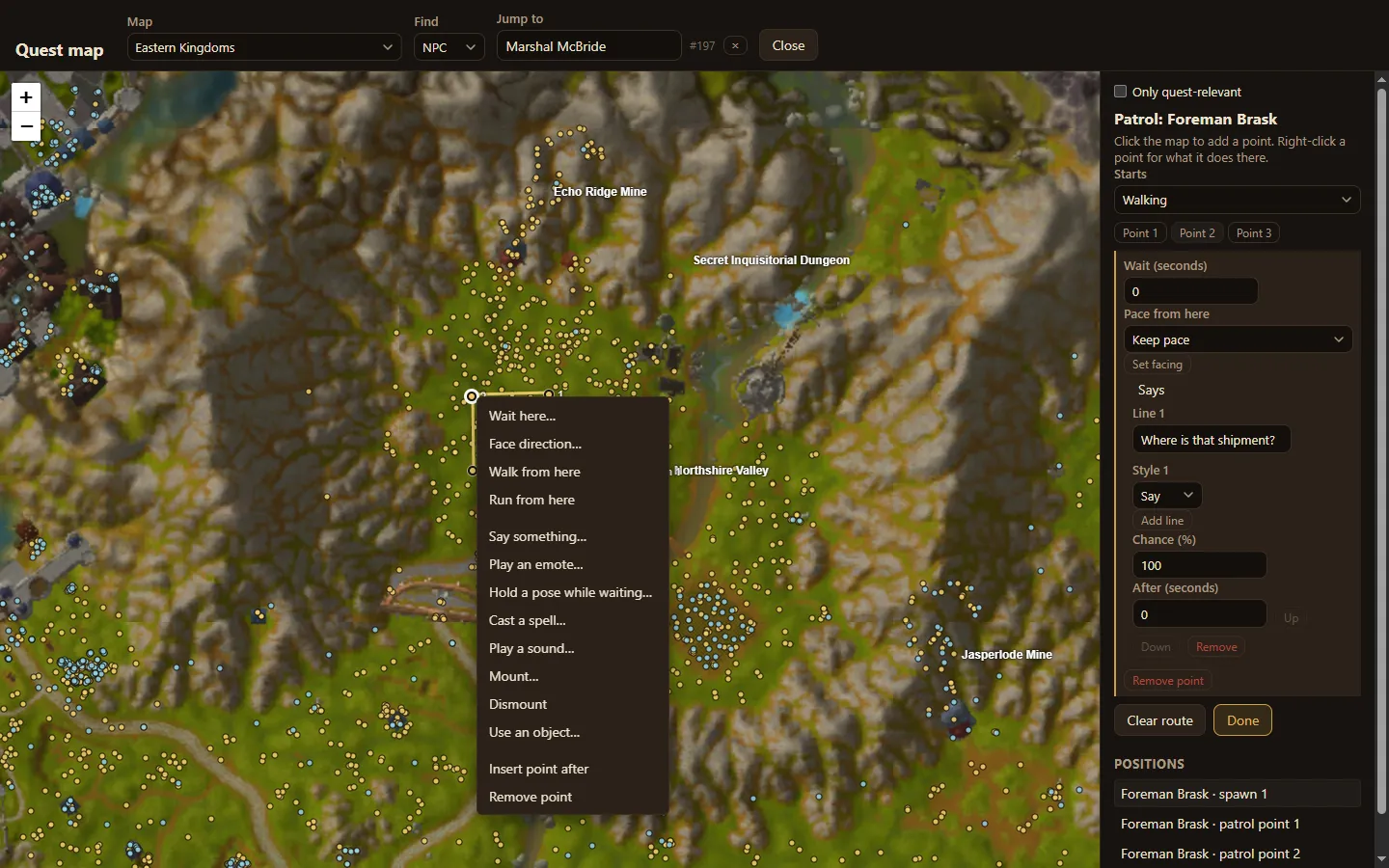
Draw a route
Section titled “Draw a route”- Place the NPC on the quest map.
- Choose Draw patrol. The panel shows Patrol: name.
- Click the map to add points in order. Each shows as Point 1, Point 2 and so on.
- Choose Done.
Under Starts, choose whether the NPC sets off walking or running. Clear route removes every point.
The NPC walks from its spawn through each point and back to where it stands, then starts again.
What happens at a point
Section titled “What happens at a point”Right-click a point for its actions:
- Wait here…: stand still for a number of seconds.
- Face direction…: turn to face a direction.
- Walk from here / Run from here: change pace for the rest of the route.
- Say something…: say one or more lines, each with a style (say, yell…), a chance and a delay.
- Play an emote…, Hold a pose while waiting…
- Cast a spell…, Play a sound…
- Mount…, Dismount
- Use an object…
- Insert point after, Remove point
Choose a point’s button in the panel to edit its settings there.