

Quest map
The quest map shows the world with your quest’s NPCs and objects on it, and everything that already stands there. Use it to place spawns instead of reading coordinates with .gps in game.
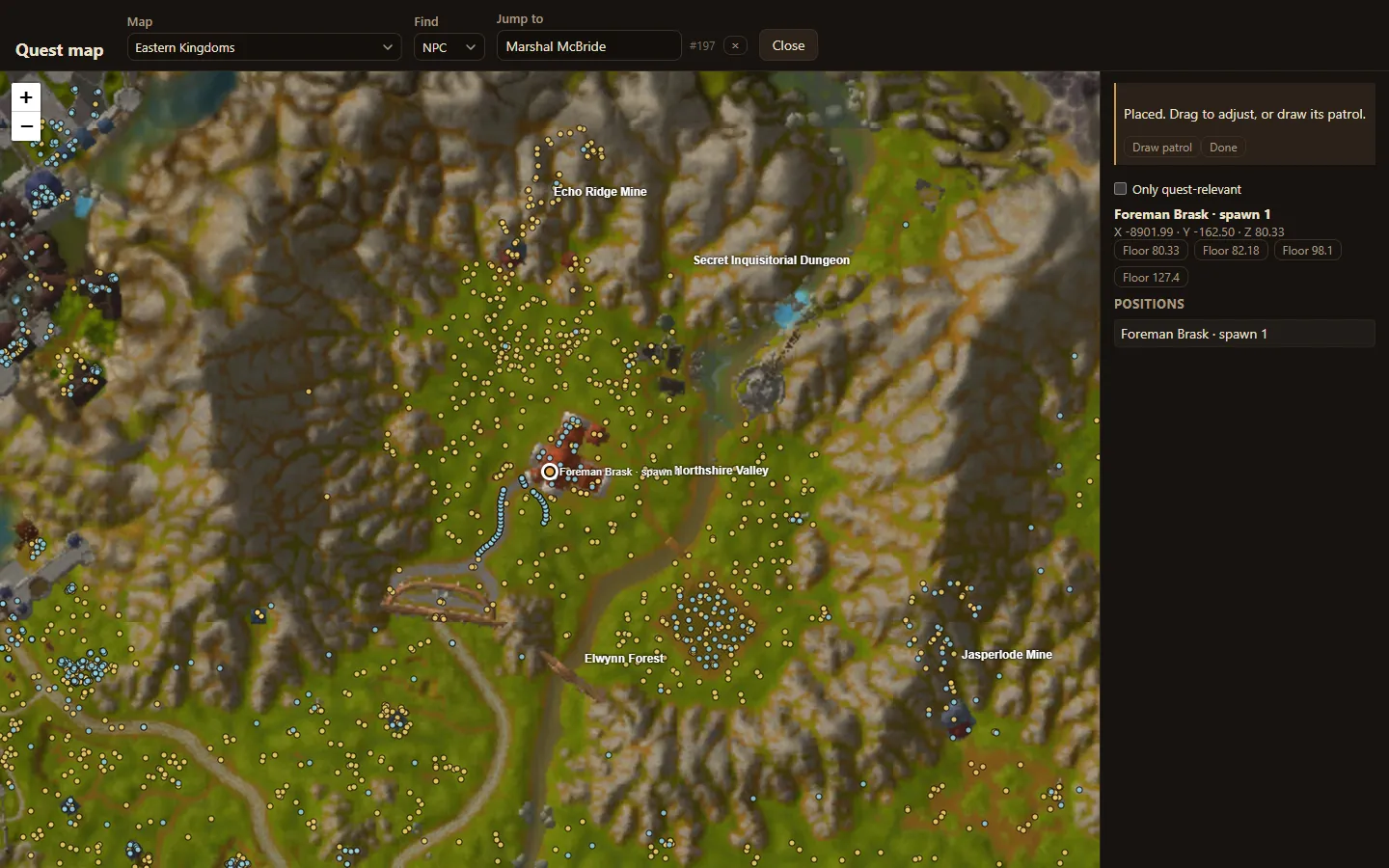
Open it with Map in the quest’s header, or with Place on map on a giver’s card.
Find a place
Section titled “Find a place”- Map: the continent or instance map, such as Eastern Kingdoms.
- Jump to: type an NPC or object that already exists to centre the map on it. Find chooses whether you search NPCs or objects.
- Zoom with + and − or the mouse wheel, and drag to move.
Existing spawns show as dots once you zoom in close enough. Only quest-relevant hides everything that is not part of your quest.
Place a spawn
Section titled “Place a spawn”When the map asks, for example Click where Foreman Brask should stand., click the spot. Drag a placed marker to adjust it.
The panel on the right shows the spawn’s position. Where there are several floors, such as the ground and a building’s upper storey, it offers each height as a Floor button; pick the one you mean.
What the map needs
Section titled “What the map needs”- The server data folder gives the relief shading, heights and floors.
- The game client folder gives the zone art and minimap.
Both are set when you connect. Without them the map still places spawns, but heights have to be checked in game.
Next: draw the NPC’s patrol.